
Lesson 1: Typing Numbers
activity 1
activity 2

activity 3
Open the link typing numbers. Use the keyboard of a laptop or computer to type in the numbers.
The idea behind this exercise is for the students to learn how to type numbers using a keyboard. Set the timer to its maximum (3 minutes). This game can only be played after setting the timer but do not hassle on the time.
Lesson 2: Typing Letters
This activity introduces the students to typing. Note that the caps lock or shift key is not required at this stage.
Lesson 3: typing words
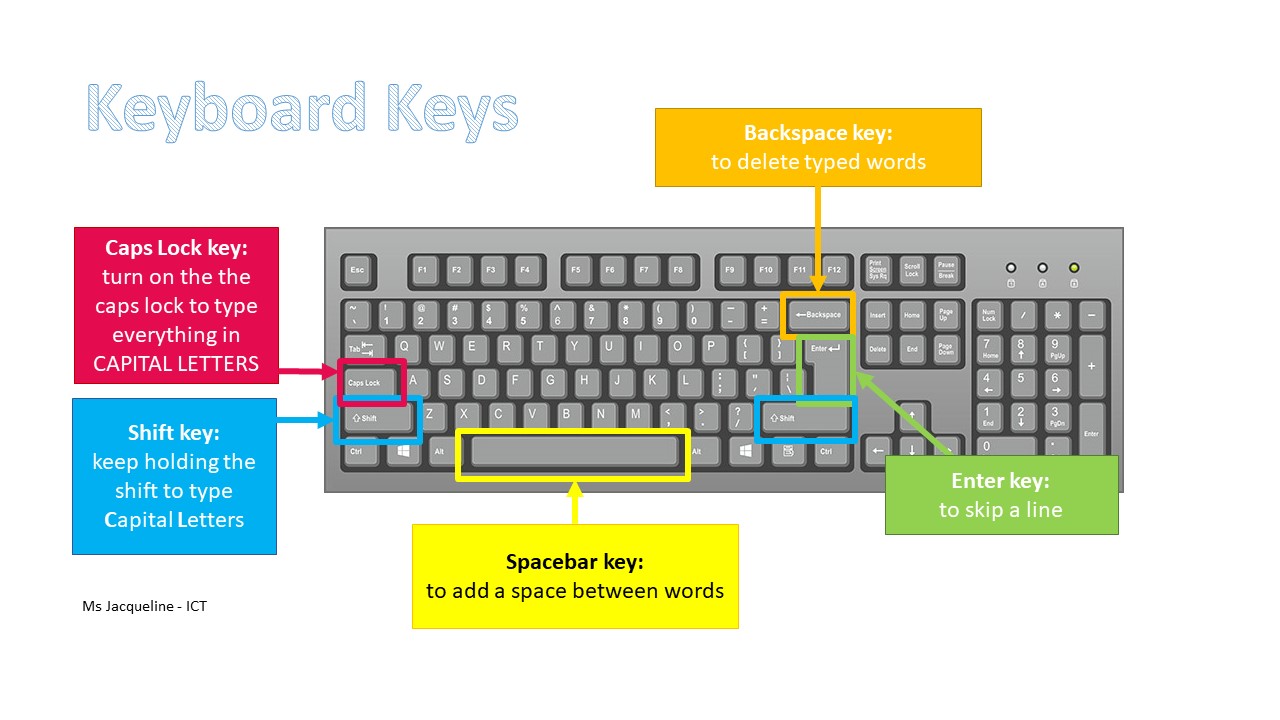
task 1: Open the worksheet Playday to practise typing with the keyboard. The student has to type in the word in the boxes provided. The backspace key is used to delete typed words.
task 2: Let’s Pack worksheet*
task 3: Food worksheet
Lesson 4: typing words and using the spacebar
task 1: Open the worksheet Too Much to practise typing with the keyboard. The student has to type in the word in the boxes provided. The backspace key is used to delete typed words.
task 2: A bad fright worksheet
task 3: TV Chef worksheet*
task 4: Transport worksheet
Lesson 5: typing capital letters using the Shift key
For this lesson, the students will use the shift key to type capital letters. Note that on a keyboard there are two shift keys.
Follow these steps to use the shift key:
- With the left-hand index finger press and hold down the shift key
- With the right-hand index finger press the letter key
- After typing the letter key, release the left-hand finger
- Use the backspace to delete extra letters typed
task 1: Open the worksheet Bee to practise the shift key. Pay attention to the capital letters in the middle of the sentence.
task 2: Cody’s Homework worksheet*
task 3: Farm_Animals worksheet
Lesson 6: typing capital letters using the Caps Lock
task 1: Open the worksheet A Good Cook to practise typing with the keyboard. Use the Caps Lock where there are whole words that are in capital letters.
task 2: Download the worksheet sea_animals to practise typing with the keyboard. The student has to type in the word in the boxes provided. The first one has been done as an example. Use the Caps Lock where there are whole words that are in capital letters.
 ICT Gozo